
Date of publication:27.06.2025
How to register and add a shipping address on Pinduoduo?
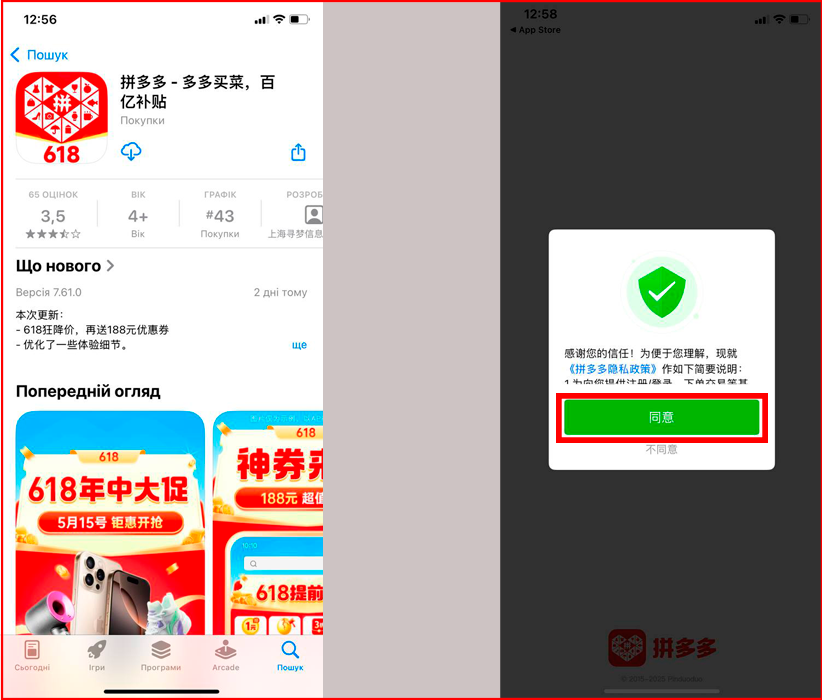
1. Download the "Pinduoduo" app from Google Play or the App Store on your mobile phone. If you have a WeChat account, log in using it.
2. If not, register using your phone number – select your country and enter your phone number, then click the red button to get the code. Enter the SMS code to confirm.
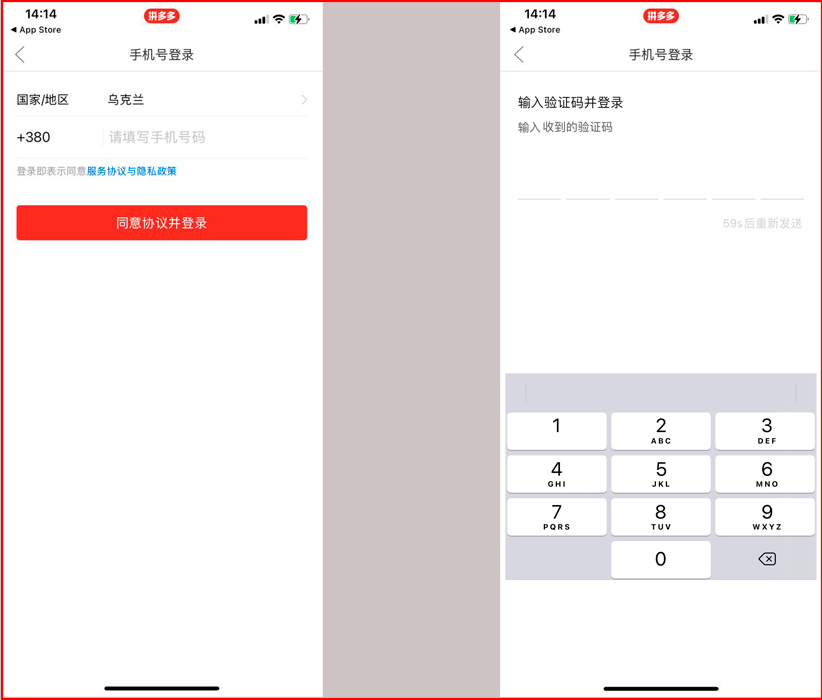
Congratulations on registering with Pinduoduo!
Add the Easyxpress warehouse address to the Pinduoduo app. To do this:
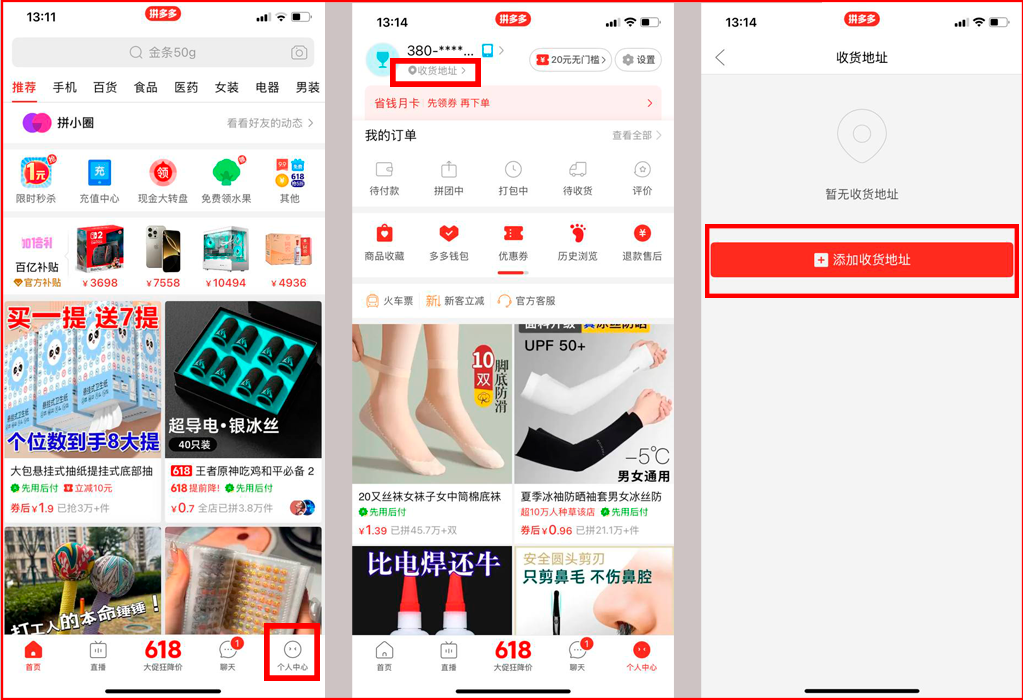
1. In the bottom right corner of the app, go to your account. Then in the top left corner, tap the location icon and click the red button to add an address.
2. Enter the address in the pop-up window:
- in the first field, paste your first and last name from the Easyxpress profile, from the "Receiver Name" field, without the "Ukr" label or cabinet number;
- in the second field, add the phone number from the "Mobile" field in your Easyxpress profile. Enter the number without the +86 code;
- in the third field, fill in the address step by step using the drop-down list. Select the province, city, and district according to the Easyxpress profile fields: "Province" – 广东省 (No. 19 in the list), "City" – 深圳市 (No. 3 in the list), "District" – 龙岗区 (No. 5 in the list);
- in the fourth field, paste your personal address from the "Address" field;
- click the red button to save the data.
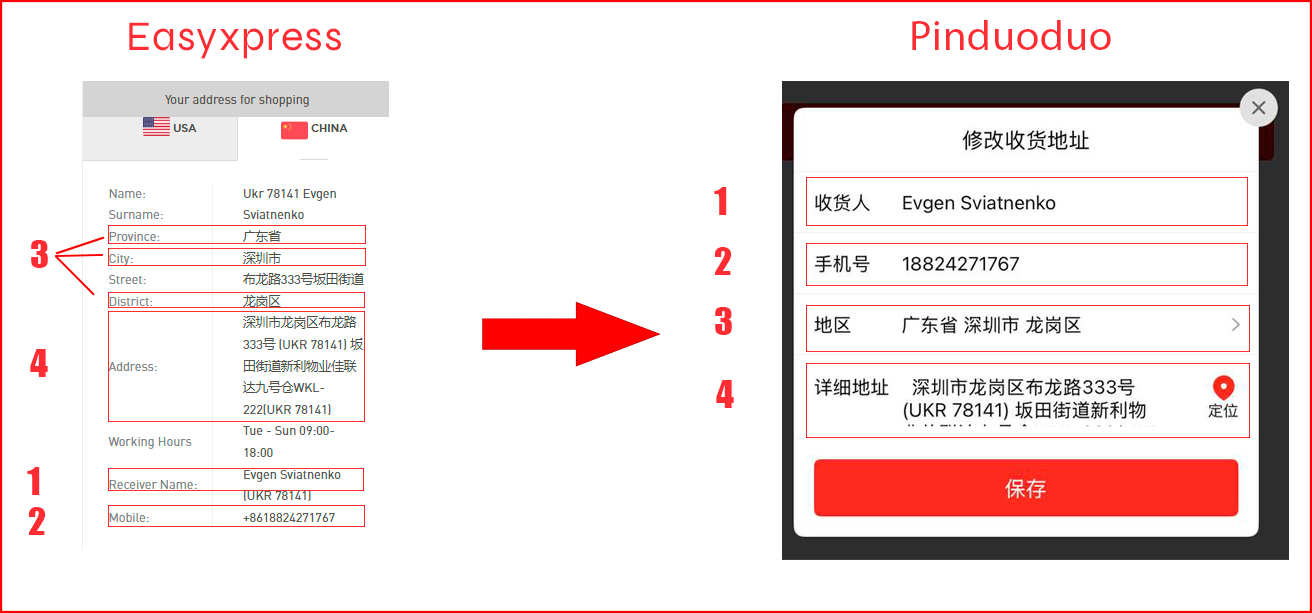
The delivery address has been added to the Pinduoduo app!
Read also



Popular Brands USA













Shopping in USA has never been so easy!
Sign up and get free US Address for delivering from online stores! Your purchases will be with you within 4-9 days!
Sign upBest useful tips
- Как купить авто на аукционе в США?
- Как искать на Ebay
- Таможенные пошлины – всё, что вы хотели знать, но боялись спросить
easyXpress reviews

Заказал себе смарт часы с амазон,дошли за неделю,сервисом доволен,все на высшем уровне. Планирую пользоваться в дальнейшем.

Замовляв одяг та взуття через easyxpress, все надійшло досить швидко. Скористався послугою розділення, та фото вмісту, прийшло все як на фотоБуду замовляти ще

Користуюсь послугами EasyXpress з 2018 року і за цей час доставила близько 40 відправлень. Хочу відзначити стабільно високий рівень обслуговування та зручність у користуванні сервісом.Всі посилки доставляються вчасно, ретельно запаковані та без жодних пошкоджень. Відзначу також чудову службу турботи: будь-які питання вирішуються швидко, професійно і з максимальним комфортом для клієнтаЗа весь час співпраці виникло, можливо, два-три спірні моменти, але кожного разу питання вирішувались у мій бік і без жодних проблем. Це ще раз підтверджує високий рівень сервісу та клієнтоорієнтованість компанії.